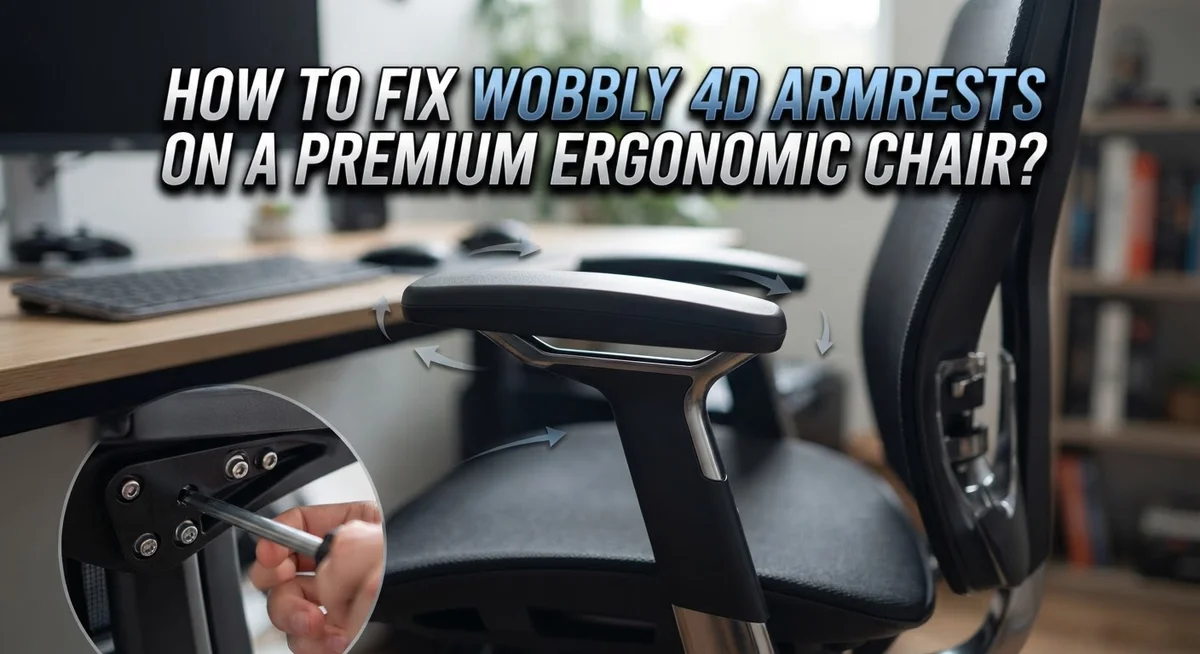
How to Fix Wobbly 4D Armrests on a Premium Ergonomic Chair?
Do your 4D armrests wobble every time you rest your elbows? This small problem can turn a premium ergonomic chair into a daily annoyance.
The good news? You can fix it yourself in minutes.
Wobbly armrests usually happen because of loose screws or bolts. These connection points hold your armrest to the chair frame.
Over time, daily movement causes these parts to loosen. Your armrest starts to shake, tilt, or feel unstable.
4D armrests are more prone to this issue. They move up, down, forward, back, rotate, and adjust in width. More movement means more parts that can loosen.
This guide will walk you through the exact steps to fix the wobble. You will learn where to find the hidden screws and brackets.
By the end, you will know how to tighten, adjust, and troubleshoot your armrests like a pro. No tools expertise needed, just a few simple steps to get your chair feeling solid again.
In a Nutshell
- Check the screws first. Most wobble comes from loose bolts where the armrest meets the chair base.
- Tighten in order. Start with mounting bracket bolts, then move to armpad screws for a snug fit.
- Go deeper if needed. Remove the four bottom screws to reach internal parts if tightening alone does not help.
- Try the O-ring trick. Adding an O-ring near the vibration point can stop future wobbling before it starts.
- Avoid common mistakes. Do not over tighten screws, and do not ignore worn parts that need replacing.
- Know when to stop tightening. If the wobble returns often, the internal component may be worn and need swapping out.
Understanding 4D Armrests and How They Work
A 4D armrest gives you four directions of movement. You can adjust it up and down. You can slide it forward and backward. You can rotate it side to side. You can also change the width between the two armrests.
This multi directional design makes the chair more comfortable. However, it also creates more connection points where loosening can happen. Each joint and pivot point is a potential wobble source.
The vertical post set screw is the most common problem area. This screw holds the armrest to the main support pole. When it loosens, the entire armrest shifts when you lean on it.
The mounting bracket bolts connect the armrest assembly to your chair base. These bolts take the most stress during daily use. Every time you rest your elbows, you put downward and rotational force on these bolts.
The armpad screws attach the cushioned surface to the metal frame. Loose armpad screws let the pad shift independently from the frame. This creates a secondary wobble even if the main connection feels tight.
Understanding these parts helps you fix wobble faster. You know exactly where to look and what to tighten first.
The key difference between a stable and wobbly armrest is simple: tight connections at all three levels. The vertical post must sit snug. The mounting brackets must be secure. The armpad must not move separately.
Most people only tighten one or two of these points. That is why wobble returns quickly. A complete fix requires checking all connection points systematically. This takes about five minutes but prevents frustration later.
What Causes Wobbly Armrests
Wobbly armrests happen for clear reasons. The main culprit is loose screws and bolts at the connection points where your armrest meets the chair base. Every time you lean on your armrests, these fasteners shift slightly. Over months of use, this movement adds up.
4D armrests are especially prone to wobbling because they move in multiple directions. The vertical post set screw bears most of the stress. When this screw loosens, the entire armrest becomes unstable. You feel it immediately when you rest your elbows.
The mounting bracket bolts also play a big role. These bolts connect the armrest assembly directly to your chair frame. If they are not tight, the armrest rocks back and forth. The armpad screws matter too. These screws hold the cushioned surface to the metal frame underneath.
Vibration from normal use causes fasteners to gradually loosen over time. This is especially true if you frequently adjust your armrests or shift positions throughout the day. The constant micro movements work against tight connections.
Worn internal components can create wobble even when screws are tight. If the metal mounting points become damaged or stripped, tightening alone will not help. The connection simply cannot hold firm anymore.
Poor initial assembly also causes problems. If the chair was not assembled correctly from the start, weak points develop faster. Some manufacturers do not tighten fasteners enough at the factory.
Understanding these causes helps you fix the issue effectively. You now know exactly what to look for and why wobble happens. This knowledge makes the repair process straightforward and faster.
Tools You Will Need Before You Start
Before you start fixing your wobbly armrest, gather the right tools. Having everything ready saves time and prevents frustration.
You will need a screwdriver set with multiple head types. Phillips head and flathead screwdrivers are most common for armrest fasteners. Grab both sizes to match your chair’s screws.
An adjustable wrench helps with bolts at the mounting bracket. This tool fits different bolt sizes without switching between multiple wrenches. A 10mm wrench also works if you prefer fixed sizes.
Consider getting a hex key set (Allen wrench). Many premium ergonomic chairs use hex bolts for armrest assembly. These come in various sizes, so a complete set covers most situations.
A flashlight or headlamp makes a big difference. You need to see underneath the armrest where screws hide. Good lighting prevents stripped screws and missed fasteners.
Grab some clean rags or cloths. Dust and debris accumulate around connection points. Wiping these areas helps you see exactly where screws sit.
An O ring (optional but useful) can help prevent future wobbling. These small rubber rings reduce vibration induced loosening. They slip around the vertical post set screw.
Have your chair manual nearby if possible. It shows exact screw locations and proper tightening order. This reference prevents guessing and mistakes.
Finally, keep a small container handy for tiny screws. Losing fasteners means extra trips to find replacements. One container keeps everything organized.
With these tools ready, you can address the wobble systematically. Start with the easiest fixes first, then move to deeper adjustments if needed.
Step-by-Step Guide to Tightening Loose Armrests
Start by flipping your chair upside down or tilting it so you can access the bottom of the armrest. Look for the mounting bracket bolts where the armrest connects to the chair base. These bolts are your first stop.
Use your wrench or hex key to tighten each bolt in a clockwise direction. Don’t rush this step. Turn slowly and check the wobble after each quarter turn. You want snug, not crushed.
Next, locate the armpad screws that hold the cushioned surface to the metal frame. These are usually visible on the underside of the armrest. Tighten these with your screwdriver, working your way around systematically. Again, check your progress frequently.
If wobble persists, remove the four bottom screws to access the internal components. This gives you a clear view of the vertical post set screw, which is the most common problem area. Tighten this screw carefully. Be gentle here because over tightening can damage the internal mechanism.
Flip your chair back over and test the armrest movement. It should feel solid without any side to side play. Move the armrest in all four directions to ensure your tightening didn’t restrict the adjustment range.
If the wobble returns within a few weeks, try this trick: place small O rings around the bolts before reinstalling them. These rubber rings absorb vibration and keep fasteners from loosening again.
Finally, sit in your chair and test the armrest at your normal working height. The armrest should feel stable and responsive to your adjustments. If wobble continues after these steps, internal wear may require component replacement rather than simple tightening.
Using the O-Ring Vibration Dampening Hack
The O-ring vibration dampening hack works by reducing movement at connection points. This method prevents fasteners from loosening due to vibration during normal chair use.
Here’s how to apply this technique. First, remove the armrest bolts completely. You’ll find these at the bottom where the armrest connects to the chair base. Keep them in a safe place so you don’t lose them.
Next, slide a small O-ring onto each bolt before reinstalling it. The O-ring sits between the bolt head and the mounting bracket. This creates a cushioning layer that absorbs vibration energy.
The key benefit is that O-rings reduce the micro-movements that cause fasteners to gradually loosen over time. When your armrest moves slightly during use, the O-ring absorbs that energy instead of transmitting it to the bolt connection.
Reinstall each bolt through the O-ring and tighten it firmly. Don’t over-tighten, as this can compress the O-ring too much and reduce its effectiveness. You want it snug but not crushed.
Test your armrest after applying this hack. Move it through all four directions of motion. The wobble should feel noticeably reduced compared to before.
This hack works best when combined with proper bolt tightening. Apply it after you’ve already tightened all connection points systematically. If wobble returns after several weeks, simply remove the bolts again and replace the O-rings.
The beauty of this method is its simplicity and low cost. You’re using basic materials to solve a mechanical problem at its source. Many users report that this single hack eliminates recurring wobble issues permanently.
Adjusting Armrest Position for Proper Ergonomics
Proper armrest positioning prevents shoulder strain and supports good posture. Your 4D armrests should sit at a height where your elbows rest comfortably at roughly 90 degrees when you sit normally.
Measure your ideal height first. Sit in your chair with your feet flat on the floor. Let your arms hang naturally. Your armrests should meet your elbows at this natural resting point. This position reduces tension in your shoulders and neck.
Adjust the vertical position by loosening the height adjustment mechanism. Most 4D armrests have a lever or knob on the side. Raise or lower the armrest until it aligns with your elbow height. Tighten the adjustment firmly to prevent drift during the day.
Forward and backward positioning matters too. Your armrests should sit close enough that your forearms rest on them without reaching. Position them so your arms form a comfortable angle. They should support your wrists without forcing them upward or downward.
Check the width adjustment if your armrests feel too close or too far apart. Your arms should rest naturally without being squeezed together or forced outward. This spacing prevents arm fatigue during long work sessions.
Test your positioning by sitting for several minutes. Your shoulders should feel relaxed, not elevated or hunched. Your forearms should rest flat on the pads without pressure points.
Wobbling armrests complicate this adjustment. A loose armrest won’t stay in your chosen position. Tighten all connection bolts before fine tuning the height and distance. Once secure, your armrests will maintain proper ergonomic positioning throughout your workday.
Common Mistakes to Avoid When Fixing Armrests
When fixing wobbly 4D armrests, avoiding common mistakes makes the difference between a quick repair and ongoing frustration. Here are the pitfalls you should sidestep.
Over-tightening screws is a frequent error. Many people assume tighter always means better, but excessive force strips threads and damages the internal components. Tighten bolts firmly until they stop naturally. Stop there.
Another mistake involves skipping the systematic check. People often tighten one screw and assume the wobble is gone. You need to check every connection point at the armrest base. Wobbling can come from multiple loose bolts working together.
Ignoring worn internal parts leads to repeated failures. If you tighten the screws and wobble returns within days, the problem isn’t loose fasteners anymore. Internal components like bushings or pivot points may be damaged. Tightening won’t fix this.
Positioning errors compound the problem. Setting armrests too high creates shoulder tension. Too low causes slouching. Too wide forces your arms outward unnaturally. Too narrow restricts movement. These poor positions make wobble more noticeable and add strain to your body.
Don’t skip the O-ring hack for persistent issues. Many people tighten everything once and call it done. If wobble returns, O-rings genuinely help by reducing micro-movements that gradually loosen bolts.
Finally, avoid assuming all screws are the same size. Your 4D armrest has different bolt sizes at different connection points. Using the wrong tool damages the bolt head and makes future tightening impossible.
Test your armrest thoroughly after each adjustment step. Sit normally and apply gentle pressure in different directions. This reveals whether wobble truly disappeared or just temporarily masked.
Troubleshooting Persistent Wobble Issues
When your 4D armrest wobbles persistently, a systematic approach saves time and frustration. Start by identifying exactly where the movement occurs. Grab the armrest pad and move it in different directions to pinpoint the loose connection point.
The most common culprit is the vertical post set screw located at the base where the armrest connects to your chair. This screw loosens naturally over time due to vibration and regular use. Use the correct screwdriver size to avoid stripping the screw head.
Check all mounting bracket bolts next. These fasteners secure the armrest assembly to the chair frame. You may need a wrench or hex key depending on your chair’s design. Tighten each bolt gradually rather than forcing one completely tight first.
Examine the armpad screws that hold the cushioned surface in place. Loose armpad screws create a hollow, rattling sensation even when the main connection is solid. Tighten these from underneath if possible.
If wobbling continues after tightening all visible fasteners, remove the four bottom screws to access internal components. This reveals the mounting mechanism and any worn parts that might cause persistent movement.
Pay attention to how much force you apply. Over tightening damages threads and cracks plastic components. Apply steady pressure until resistance increases, then stop.
Test the armrest after each adjustment step. Move it in all directions to confirm stability. Sometimes fixing one connection point reveals another loose area you hadn’t noticed initially.
If wobbling returns quickly after tightening, worn internal components may be the issue. Metal parts can develop play over time, requiring replacement rather than simple adjustment. Document which screws loosen repeatedly to identify problem areas for future maintenance.
Final Thoughts
Fixing a wobbly 4D armrest doesn’t have to feel overwhelming. Most problems come down to loose screws at the connection points. A screwdriver and a few minutes usually solve the issue.
Start with the simple fixes first. Tighten the mounting bracket bolts and armpad screws before assuming something is broken. Many wobbles disappear with basic tightening alone.
If the wobble persists, check the vertical post set screw. This small part often causes big problems when it loosens over time.
For chairs that keep loosening despite your best efforts, the O-ring hack works well. This simple trick absorbs vibration and keeps screws from backing out again.
Remember that patience matters here. Rushing through the tightening process often leads to stripped screws or over-tightened parts that crack under pressure.
Take your time with each connection point. Test the armrest after every adjustment. This habit helps you catch problems early instead of discovering them later.
Sometimes tightening alone won’t fix everything. Worn internal components need replacement, not repair. If your armrest wobbles again shortly after fixing it, this is likely the cause.
Your comfort depends on stable armrests. A wobbly armrest disrupts your posture and adds unnecessary strain to your workday. Fixing it properly protects your body long term.
Keep your tools handy for future check ups. Armrests loosen naturally with regular use. A quick monthly inspection keeps your chair working like new.
With these steps, you can handle most wobble issues yourself. Simple maintenance now saves you bigger headaches later. Your chair should support you, not distract you with annoying movement.
Frequently Asked Questions
Why does my 4D armrest wobble in the first place?
Wobbling happens when screws and bolts at the connection points loosen over time. Your armrest connects to the chair through multiple fasteners. Vibration from daily use causes these fasteners to gradually shift. The vertical post set screw is often the main culprit. This single screw supports much of the armrest’s weight and movement.
Where exactly are the screws I need to tighten?
Look at the bottom of your armrest where it meets the chair base. You’ll find mounting bracket bolts there. The armpad screws hold the cushioned part in place. The vertical post set screw sits where the armrest connects to the main post. If you need deeper access, four screws on the bottom panel allow you to reach internal components.
Can I fix this myself or do I need professional help?
Most wobble issues you can fix yourself with basic tools. Start by tightening visible screws using the correct screwdriver or wrench size. If wobbling stops, you’re done. If it continues after tightening all fasteners, the problem may involve worn internal parts. That’s when professional service becomes helpful.
What’s this O-ring hack I keep hearing about?
O-rings are rubber rings that reduce vibration. Place them around screws before tightening. They absorb movement and prevent fasteners from loosening quickly. This works especially well for chairs that keep wobbling despite repeated tightening. It’s a simple, effective solution for persistent issues.
How often should I check my armrests?
Check your armrests monthly if you use your chair daily. A quick wiggle test tells you if tightening is needed. Regular checks prevent major wobble problems from developing.

Hi, I’m Clara! I started SitSmartGuide to help people find chairs that truly support their comfort and health — without the guesswork. After years of dealing with back pain from bad seating, I became obsessed with testing, researching, and reviewing chairs so you don’t have to learn the hard way.