
How to Fix Neck Stiffness While Typing All Day?
You sit down at your desk. You start typing. Hours pass. Then it hits you. A tight, aching sensation crawls up the back of your neck. Your shoulders feel like rocks. Turning your head becomes a chore.
Sound familiar? You are not alone. Americans spend an average of seven hours per day on screens, according to DataPortal’s global overview report. This extended screen time puts enormous strain on the muscles in the back of the neck.
The condition has earned a name: tech neck. It causes headaches, muscle spasms, pain between the shoulder blades, and even numbness or tingling in the arms. The good news? You can fix it.
This post gives you 15 practical, step by step solutions to relieve neck stiffness from typing and prevent it from coming back. Every solution here is based on guidance from spine surgeons, physical therapists, and ergonomic research. Keep reading to take control of your comfort and your health.
Key Takeaways
- Sitting up perfectly straight is not the answer. Reclining your chair 25 to 30 degrees with good lumbar support places far less force on your neck and spine than a rigid upright posture. This small adjustment alone can reduce muscle strain throughout the day.
- Move every 20 to 30 minutes. Research from Johns Hopkins Medicine shows that changing your position every 30 minutes to one hour prevents muscle fatigue and pain. Even a one minute walk makes a difference.
- Your monitor height matters more than you think. The top of your screen should sit at or slightly below eye level, about an arm’s length away from your face. A screen that is too low forces your head forward and down, which triggers neck stiffness.
- Stretching alone will not solve the problem. You also need to strengthen the muscles in your neck and upper back. Stronger muscles tolerate longer work sessions and fatigue less quickly.
- Aerobic exercise reduces neck pain. Spine surgeons recommend 20 to 30 minutes of cardio three to four times per week. This sends oxygenated blood to tired muscles and washes away chemicals that cause inflammation and pain.
- Untreated tech neck can lead to serious problems. Tight muscles increase pressure on spinal discs. Over time, this can cause disc bulging, rupture, or pinched nerves that may require surgery.
Why Does Your Neck Get Stiff From Typing
Your neck was not built to hold the same position for eight hours straight. The muscles in the back of the neck must contract continuously to hold your head upright while you look at a screen. This creates a static load that tires the muscles quickly.
The average human head weighs about 10 to 12 pounds in a neutral position. But the moment you tilt it forward, the effective weight increases dramatically. At a 15 degree tilt, your neck feels about 27 pounds. At 45 degrees, it feels closer to 50 pounds. This is the position many people hold for hours while typing on a laptop or looking at a low monitor.
The problem compounds over time. Tired muscles tighten up. Tight muscles increase pressure on the discs between your vertebrae. This leads to faster wear and tear on the cervical spine. Poor desk setup, bad posture habits, and lack of movement all feed into this cycle.
Stress also plays a role. Many people carry tension in their upper trapezius muscles, which connect the neck to the shoulders. Emotional stress combined with physical strain creates a double burden on the neck. Understanding these causes is the first step to fixing the problem.
How Poor Posture Creates a Chain Reaction
Neck stiffness from typing rarely stays isolated to the neck. It creates a chain reaction through your upper body. When your head pushes forward, your shoulders round inward. Your chest muscles (the pectorals) shorten and tighten. Your upper back rounds into a hunched position.
This hunched posture then makes it impossible to bring your neck back to a neutral position. The muscles in your upper back weaken because they are stretched out all day. The muscles in the front of your body shorten because they stay in a compressed position. This imbalance locks you into a pain cycle.
Physical therapists call this upper crossed syndrome. The pattern involves tight chest muscles, tight upper trapezius muscles, weak deep neck flexors, and weak mid back muscles. You cannot fix neck stiffness by focusing on the neck alone. You must address the entire chain.
Try this simple test: push your neck forward like a turtle. Now try to lift your arms above your head. Then sit up straight and try again. You will notice a significant difference in your range of motion. This shows how posture in one area directly affects movement in another.
Set Up Your Monitor at the Right Height
One of the fastest fixes for neck stiffness is adjusting your monitor height. The Mayo Clinic recommends placing the top of your screen at or slightly below eye level. The screen should sit about an arm’s length from your face, between 20 and 40 inches away.
A screen that sits too low forces you to tilt your head forward and down. This is the primary trigger for tech neck. A screen that sits too high causes you to extend your neck backward, which strains different muscles and can cause headaches.
If you use a laptop, consider placing it on a stand or a stack of sturdy books to raise the screen. Then use an external keyboard and mouse so your hands stay at the correct height. This simple change separates the screen height from the keyboard height, which solves the biggest ergonomic flaw of laptop use.
For dual monitor setups, place your primary monitor directly in front of you. Position the second monitor close beside it at the same height. This prevents you from twisting your neck to one side throughout the day. Twist and rotation under static load is a common but overlooked cause of one sided neck pain.
Recline Your Chair Instead of Sitting Straight
This tip surprises most people. Sitting up perfectly straight is not good for your neck or back. Dr. K. Daniel Riew, a cervical spine surgeon at NewYork Presbyterian/Weill Cornell Medical Center, explains that sitting upright forces the neck muscles to contract constantly to hold the head up. It also places more force on the discs in the lower back.
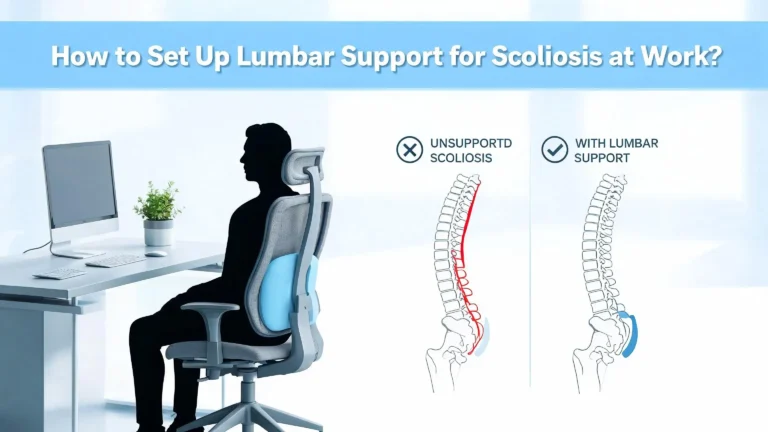
A better approach is to recline your chair 25 to 30 degrees while maintaining good lumbar support. In this position, part of your body weight transfers into the chair backrest instead of running straight down your spine. The muscles in the back of your neck can relax because gravity is no longer pulling your head forward.
Here is a quick check: if you fell asleep in your seated position, your head should fall backward, not forward. If it would fall forward, you are not reclined enough. You can also place your hand on the back of your neck. Lean forward and feel the muscles tighten. Then lean back and feel them soften. That soft feeling is your goal throughout the day.
Make sure your chair provides solid lumbar support. Without it, reclining will cause you to slouch, which creates a different set of problems. A small lumbar cushion can help if your chair lacks built in support.
Position Your Keyboard and Mouse Correctly
Your keyboard and mouse placement directly affects your neck. If they are too far away, you will lean forward to reach them. If they are too high, your shoulders will hunch upward. Both positions strain the neck.
Place your keyboard directly in front of you so your wrists and forearms stay in a straight line. Your elbows should rest at roughly a 90 degree angle, close to your body. Your shoulders should feel relaxed, not lifted or pushed forward.
Keep your mouse on the same surface as your keyboard and within easy reach. Stretching your arm out to grab a mouse that sits too far to the side causes one shoulder to pull forward. Over time, this asymmetry creates tension that radiates up into the neck.
If you type for long hours, consider a keyboard tray that lets you adjust the height and angle independently of your desk. This gives you more control over your arm position. The goal is to keep your hands at or slightly below elbow level while your shoulders remain dropped and relaxed. Even small misalignments add up over a full workday and contribute to stiffness by the afternoon.
Take Movement Breaks Every 20 to 30 Minutes
Your body was not designed to sit still for hours. Experts from Johns Hopkins Medicine recommend changing positions every 30 minutes to one hour. Other specialists suggest even more frequent breaks, with brief 1 to 2 minute breaks every 20 to 30 minutes.
The 20 20 20 rule provides a simple framework. Every 20 minutes, look at something at least 20 feet away for 20 seconds. This relaxes the eye muscles and encourages you to lift your head to a neutral position. Pair this with a quick posture reset and you have a powerful habit.
Getting up to walk, even for just 60 seconds, brings blood flow back to tired muscles. It changes the position of every joint in your body. It also gives your brain a reset, which often improves focus and productivity when you return to your desk.
Set a timer on your phone or computer if you forget to take breaks. There are also free apps that remind you to stand, stretch, or walk at regular intervals. The key is consistency. One long stretch break at lunch does not undo the damage of six straight hours of sitting. Frequent short breaks deliver much better results for neck stiffness.
Do Chin Tuck Exercises at Your Desk
The chin tuck is one of the most effective exercises for neck stiffness from typing. It stretches the muscles in the back of the neck and reduces compression on the facet joints of the cervical spine. You can do it right at your desk without drawing attention.
Stand or sit with your spine straight. Pull your chin straight back, as if you are trying to make a double chin. Do not tilt your head up or down. Hold this position for 5 to 10 seconds and then release. Repeat 10 times.
For a deeper stretch, stand with your back against a wall. Place the back of your head against the wall and pull your chin in, trying to flatten the curve in the back of your neck against the wall surface. If your upper back is stiff, place a small rolled towel between your head and the wall.
This exercise directly counteracts the forward head posture that typing creates. It strengthens the deep neck flexor muscles, which are the small stabilizers that support a healthy neck position. Spine specialists recommend doing this exercise several times throughout the workday, especially after long periods of screen use. It takes less than a minute and provides immediate relief for many people.
Stretch Your Chest and Shoulders
Tight chest muscles pull your shoulders forward and push your head into a forward position. You cannot achieve good neck posture without addressing chest tightness. The pectoral stretch is a simple exercise that opens up the front of your body.
Stand in an open doorway. Raise your arms to the side with your elbows at shoulder height and forearms pointing upward. Place your forearms against the door frame. Step forward gently until you feel a stretch across the front of your chest. Hold this position for 30 seconds and repeat twice.
Then move your arms slightly higher and repeat the stretch. This targets a different part of the pectoral muscle group. The two positions together cover the full range of the chest muscles.
The upper trapezius stretch is equally important. Sit on your left hand to anchor your shoulder down. Tilt your head to the right, bringing your right ear closer to your right shoulder. Hold for 10 seconds and switch sides. Repeat three times on each side. This stretch targets the muscle that runs from your neck to the top of your shoulder, which is one of the first muscles to tighten from stress and desk work.
Strengthen Your Neck and Upper Back Muscles
Stretching provides short term relief. Strengthening provides long term protection. Stronger muscles tolerate longer work sessions, fatigue less quickly, and recover faster. You need both stretching and strengthening to fix neck stiffness from typing.
The overhead press is a simple strengthening exercise. Stand with your feet hip width apart and knees slightly bent. Tuck your elbows into your sides with forearms pointing outward. Slowly raise your arms all the way up while gently squeezing your shoulder blades back. Lower them down slowly. Do up to 15 repetitions for three sets.
Rows are another effective exercise. Use a resistance band attached to a sturdy object at chest height. Hold one end in each hand with your arms extended in front of you. Pull back slowly, bringing your elbows to your sides at a 90 degree angle. Pause and release slowly. Do up to 15 repetitions for three sets.
For direct neck strengthening, link your hands behind your head. Gently press your head backward against the resistance your hands provide. Hold for a few seconds and repeat 5 to 10 times. Dr. Riew recommends doing this for every hour you spend looking down. Use gentle force only. Over strengthening the neck muscles can create new problems. Start with light effort and increase gradually.
Try a Standing Desk for Part of the Day
Standing while you work changes the entire load distribution on your spine. It naturally encourages a more upright head position and engages the muscles in your legs, core, and back. You do not need to stand all day. Alternating between sitting and standing every 30 to 60 minutes gives your neck the variety it needs.
A standing desk, or an adjustable desk converter that sits on top of your existing desk, allows you to switch positions easily. When standing, the same monitor and keyboard rules apply. Your screen should sit at eye level, and your elbows should remain at roughly 90 degrees.
If a standing desk is not available, you can improvise. Place your laptop on a high counter, a bookshelf, or a stack of sturdy boxes. The goal is to give your neck a different position for part of the day. Even 15 to 20 minutes of standing per hour makes a meaningful difference.
Pay attention to your standing posture as well. Avoid locking your knees or leaning to one side. Keep your weight evenly distributed on both feet. Standing with poor posture can cause just as much neck stiffness as sitting with poor posture.
Use Aerobic Exercise to Heal Tired Muscles
This solution goes beyond your desk. Aerobic exercise sends oxygen rich blood to the muscles in your neck and upper back. It also flushes out the inflammatory chemicals that accumulate in fatigued muscle tissue. Spine surgeons consider regular cardio one of the most effective treatments for chronic neck stiffness.
Aim for 20 to 30 minutes of aerobic activity three to four times per week. Good options include brisk walking, jogging, swimming, cycling, or using an elliptical machine. The goal is to get your heart rate up, increase your breathing rate, and work up a sweat.
Swimming is particularly helpful because it involves full range of motion movement through the neck and shoulders while the water supports your body weight. Walking at a brisk pace is the most accessible option and requires no equipment or gym membership.
The benefits go beyond the physical. Aerobic exercise reduces stress hormones like cortisol, which contribute to muscle tension in the neck and shoulders. It also improves sleep quality, which gives your muscles more time to repair overnight. Regular exercise will not prevent age related disc wear, but it significantly reduces the risk of experiencing tech neck symptoms according to cervical spine specialists.
Manage Stress to Reduce Muscle Tension
Stress tightens muscles. This is not a metaphor. Your body responds to mental and emotional stress by contracting muscles, especially in the neck and shoulders. The upper trapezius muscle is one of the most common places people store tension. A tight trapezius can cause neck pain, shoulder pain, and headaches around the eyes.
If you carry stress in your neck, no amount of ergonomic adjustment alone will solve the problem. You need active stress management strategies. Deep breathing exercises calm the nervous system and reduce muscle tension within minutes. Try inhaling for four counts, holding for four counts, and exhaling for six counts. Repeat this five times.
Progressive muscle relaxation is another effective technique. Starting from your feet and working up to your head, tense each muscle group for five seconds and then release. When you reach your shoulders and neck, you will often notice how much tension you were holding without realizing it.
Short meditation sessions of five to ten minutes per day have been shown to reduce perceived stress and muscle tension. You do not need to master meditation to benefit from it. Simply sitting quietly and focusing on your breathing for a few minutes creates a measurable physiological shift that relaxes the neck muscles.
Adjust Your Phone Habits
Your phone may be causing just as much neck stiffness as your computer. Most people hold their phone low, near waist or chest level, and tilt their head down to look at it. This puts the same forward head load on your neck that a low computer screen creates.
Raise your phone to eye level whenever you use it. Hold it up in front of your face instead of in your lap. This keeps your cervical spine in a neutral position and prevents the muscles from overworking.
If you spend long periods reading on your phone, consider using a phone stand or propping it on a surface at eye level. Many people scroll their phones during work breaks, which means they trade one form of neck strain for another. A true break means changing your neck position, not just changing the screen you are looking at.
Phone calls also contribute to neck stiffness. Cradling the phone between your ear and shoulder is one of the worst positions for the cervical spine. Use speakerphone or a headset instead. The Mayo Clinic specifically identifies phone cradling as a common source of neck and shoulder strain for office workers.
Know When to See a Professional
Most cases of neck stiffness from typing respond well to the solutions described in this post. However, some symptoms require professional attention. See a doctor if you experience numbness, tingling, or weakness that extends into your arms or hands. These symptoms may indicate a pinched nerve or disc problem.
Persistent headaches that start at the base of the skull and radiate forward also deserve medical evaluation. Pain that does not improve after two to four weeks of consistent ergonomic changes and exercise is another sign to seek help.
A physical medicine and rehabilitation (PM&R) doctor, also called a physiatrist, is an excellent first stop. These specialists focus on musculoskeletal problems and treat them without surgery. Physical therapists can also assess your posture, identify specific muscle imbalances, and create a targeted exercise program.
Surgery is rarely needed for tech neck. But in severe cases where a disc has ruptured and pinched a nerve, it may become necessary. The best approach is to address neck stiffness early before it progresses. Prevention and consistent daily habits are far more effective than any treatment after damage has occurred.
Build a Daily Routine That Protects Your Neck
The most effective solution for neck stiffness is a daily routine that combines several of the strategies in this post. One single change will not fix the problem. You need a combination of proper setup, regular movement, targeted exercises, and healthy habits.
Start your morning by checking your desk setup. Confirm that your monitor is at eye level, your chair is reclined with lumbar support, and your keyboard is at the right height. Set a recurring timer to remind you to stand or stretch every 20 to 30 minutes.
Build a quick exercise routine into your day. Chin tucks in the morning, chest stretches at lunch, and neck strengthening exercises in the afternoon take less than 10 minutes total. Add three to four sessions of aerobic exercise per week outside of work.
Track your symptoms for a week. Note when your neck feels worst and what you were doing before the pain started. This helps you identify your personal triggers and adjust your routine accordingly. Many people discover that a specific activity, such as using a laptop without a stand or scrolling their phone in bed, causes most of their stiffness. Small, consistent changes produce lasting results.
Frequently Asked Questions
How long does it take to fix neck stiffness from typing?
Most people notice improvement within one to two weeks of making ergonomic changes and doing daily exercises. Significant improvement usually takes four to six weeks of consistent effort. If your neck stiffness has been building for months or years, recovery may take longer. The key is staying consistent with posture adjustments, movement breaks, and strengthening exercises. Do not expect overnight results, but small gains add up quickly.
Can neck stiffness from typing cause permanent damage?
Yes, it can if left untreated for a long time. Chronic forward head posture increases pressure on the cervical discs, which can lead to disc degeneration, bulging, or rupture over time. A ruptured disc can pinch a nerve and cause pain, weakness, or numbness in the arm. In severe cases, this requires surgical treatment. Early intervention with posture correction and regular exercise significantly reduces this risk.
Is a standing desk better than a sitting desk for neck pain?
Neither is better on its own. The best approach is to alternate between sitting and standing throughout the day. Standing all day can cause its own problems, including lower back fatigue and leg pain. Switching positions every 30 to 60 minutes gives your neck and spine the variety of movement they need. Both positions require correct monitor and keyboard placement to protect the neck.
What is the best sleeping position for neck stiffness?
Sleeping on your back or on your side with proper pillow support is best. Your pillow should keep your cervical spine in a neutral position, meaning your head should not tilt up or down relative to your body. Avoid sleeping on your stomach, as this forces your neck into a rotated position for hours. A supportive pillow that fills the gap between your neck and the mattress helps maintain proper alignment through the night.
Should I use heat or ice for neck stiffness?
For stiffness caused by muscle tension and fatigue, heat is generally more effective. A warm towel, heating pad, or warm shower relaxes tight muscles and improves blood flow to the area. Use heat for 15 to 20 minutes at a time. Ice is better for acute injuries or inflammation. If your neck stiffness comes with visible swelling or sharp pain from a sudden onset, start with ice and then switch to heat after the first 48 hours.
How do I know if my neck stiffness is serious?
Neck stiffness from typing is usually muscular and resolves with rest, stretching, and ergonomic changes. However, certain symptoms signal a more serious problem. Seek medical attention if you have numbness or tingling in your arms or hands, weakness in your grip, persistent headaches, pain that radiates down your arm, or neck stiffness that does not improve after several weeks of self care. A healthcare professional can evaluate whether a nerve or disc problem needs treatment.

Hi, I’m Clara! I started SitSmartGuide to help people find chairs that truly support their comfort and health — without the guesswork. After years of dealing with back pain from bad seating, I became obsessed with testing, researching, and reviewing chairs so you don’t have to learn the hard way.